


The UK now has 2.1 million garden offices (Legal & General, 2024), and with 28% of workers now splitting their week between home and a conventional workplace (ONS, Q1 2025), the cabin at the end of the garden has become a legitimate professional workspace. The problem is that your home router was never designed to push a reliable signal through brick walls, across 20 metres of garden, and into a timber-framed outbuilding. The result is a wireless dead spot exactly where you need the internet most. This garden office Wi-Fi guide covers every real-world option for fixing that — ranked from the approach we install most often to the one we would rather you avoided entirely.
(Legal & General, 2024)
arrangements (ONS, Q1 2025)
listings over a decade (L&G)
Why Your Wi-Fi Struggles to Reach the Garden Office
Distance alone does not explain the problem. Every obstacle between your router and the garden office absorbs, reflects, or scatters the radio signal. A single brick wall can remove 10–15 dB of signal strength. Add a glass door, a metre of open air, and 15 metres of garden, and you have lost enough signal that your laptop connects but cannot sustain a video call. The 5 GHz band — faster but shorter range — drops off far more sharply than 2.4 GHz through solid materials. The 2.4 GHz band travels further but is congested and slower. Neither band solves the underlying physics. What you need is a proper connection method, not simply a better router.
Gardens also add obstacles that most people underestimate: dense hedges, brick boundary walls, insulated shed walls, and the sheer distance of air between a wall-mounted router and an outbuilding 20–30 metres away. Upgrading to a Wi-Fi 6 or Wi-Fi 6E router helps with device congestion and throughput in crowded environments, but it cannot overcome the physics of signal attenuation over distance and through obstacles.
Option 1 — Buried Ethernet Cable: The Gold Standard
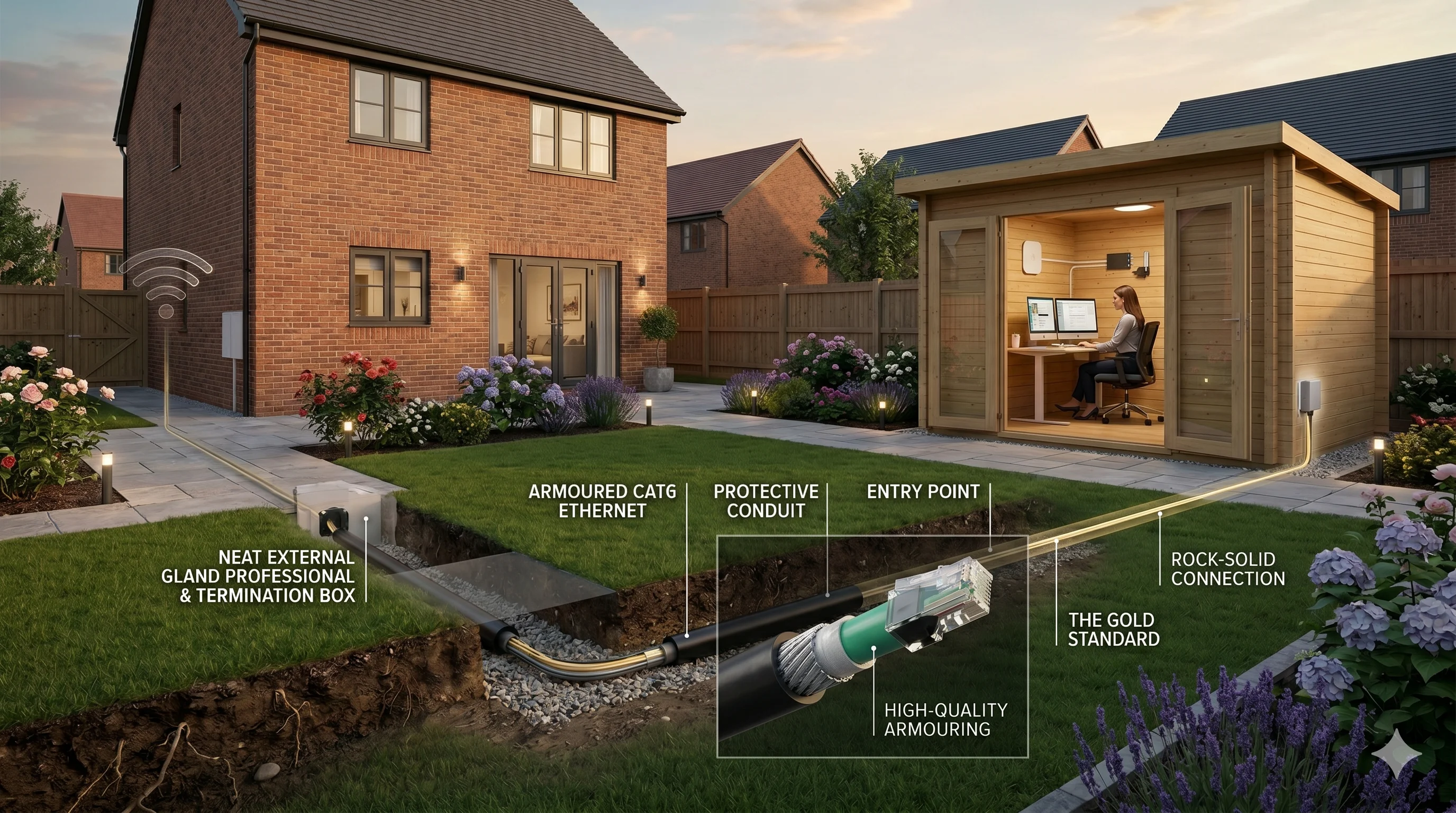
For garden office Wi-Fi that never drops, buried ethernet is the only option that delivers your full broadband speed with zero interference, zero dead spots, and zero ongoing maintenance. Once it is in the ground, it works. Cat6 cable supports up to 1 Gbps over runs up to 100 metres (IEEE 802.3) — more than sufficient for any UK home broadband connection. We have installed garden ethernet runs across London and the M25 corridor, and the result is always the same: customers never need to touch it again.
Cat6 vs Cat6A: Which Cable?
Cat6 supports 1 Gbps and is the correct choice for most garden office runs. Cat6A supports 10 Gbps but is stiffer, heavier, and genuinely overkill for a residential broadband connection. Cat6 is the right call unless you are running a server or operating close to the 100 m hard limit. Both are available in armoured outdoor variants. Choose Cat6 armoured and spend the saved budget on a better access point inside the garden office.
Burial Depth and Cable Type: What the Regulations Require
IET BS 7671 Wiring Regulations are specific: armoured cable buried under a garden must sit at a minimum depth of 450–500 mm. Shallower than that, and a garden fork during spring planting can slice through it. You must use armoured cable outdoors — Steel Wire Armoured (SWA) or XLPE-armoured Cat6 are both suitable. Never bury standard indoor Cat6 in the ground, even inside plastic conduit alone. A qualified electrician must sign off any circuit extension under Part P.
Always run armoured cable through a plastic conduit when burying it. Conduit protects against ground movement over time and makes future replacement straightforward — pull the old cable out, thread the new one in. Without conduit, replacing a buried cable means digging the entire trench again.
What Does a Buried Ethernet Run Cost?
A professional installation of a buried Cat6 armoured run in London typically costs £150–£250, covering the cable, labour, trench digging, weatherproof outdoor enclosures at both ends, and Part P sign-off. DIY materials alone run £80–£150 depending on trench length and whether you hire a cable layer or use a mini trencher. The end result is a full ethernet port inside the garden office — plug in a switch, add a Wi-Fi access point, and you have a fully wired workspace.
Option 2 — Mesh Wi-Fi Node or Outdoor Access Point
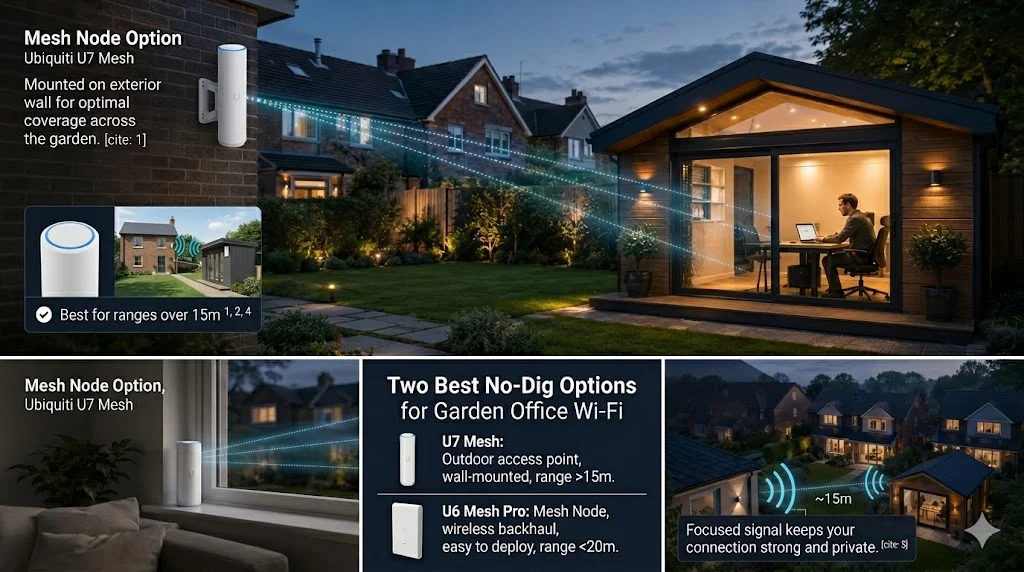
A dedicated mesh node or outdoor access point placed near or just outside the garden office is the best no-dig solution. Unlike a basic Wi-Fi repeater — which halves bandwidth at every hop — a properly configured mesh node or dedicated outdoor AP maintains near-full throughput and delivers a consistent signal to the outbuilding.
Mesh Nodes
Modern mesh systems (Eero, Google Nest, TP-Link Deco) allow satellite nodes to be placed anywhere within range of the primary router. Place a node on the exterior wall of the house closest to the garden office, or just inside a window facing the garden. The node backhauls to your main router wirelessly (or via a wired connection if you have ethernet already running to that location) and rebroadcasts a strong signal toward the outbuilding. Works well for: timber-framed garden offices within 10–20 metres with no thick masonry walls between them and the node.
Outdoor Access Points
Dedicated outdoor access points — such as the Ubiquiti UniFi (our primary hardware partner) or TP-Link EAP outdoor range — are weatherproof, powered via PoE (IEEE 802.3af, 15.4 W per port), and designed specifically for outdoor ranges. Mount one on the exterior wall of the house facing the garden. The AP connects back to your router via a single Cat6 PoE cable and delivers a focused, high-power signal across the garden. This is significantly more effective than any consumer mesh node for ranges over 15 metres.
Mount the mesh node or outdoor AP on the exterior wall of the house facing the garden office — as high as practical, with line of sight to the outbuilding. Every metre of height gained reduces the obstacle angle and improves range. Even a node placed at a first-floor window can make the difference between a usable and unusable signal at the garden office end.
Option 3 — Point-to-Point Wireless Link
When burying cable is not feasible and mesh does not reach, a dedicated point-to-point wireless bridge delivers gigabit-class speeds over distances where standard Wi-Fi fails entirely. Two directional radios create a private microwave link between the house and the garden office. The result is a full ethernet port at the garden office end, identical in function to a buried cable — without any digging.
Video: Extending Wi-Fi to a garden office or outbuilding
How It Works
One unit mounts on the house (ideally under eaves or on a high exterior wall), the other mounts on the garden office. Both are PoE-powered — no separate power supply needed at either end. They connect to your router and to a switch or access point in the garden office via standard Cat6 patch cables. Setup takes minutes once the units are positioned correctly.
The TP-Link CPE510 is a reliable, affordable example: 5 GHz, rated at 300 Mbps throughput, with a quoted range of 15 km in open air. For most UK garden offices — which are 10–50 metres from the house — even the most basic point-to-point bridge hardware is massively over-specified for distance. What matters is clearance, not range.
Point-to-point wireless links require clear line of sight between the two units. A dense hedge, a large tree, or even a washing line strung between the house and the garden office can cut throughput by 80% or more. Check your sightline before purchasing hardware — and prune aggressively in spring before the leaves return.
Why Powerline Adapters Are Almost Always a Last Resort
Powerline adapters look like the simplest solution — plug one in by the router, plug one in by the garden office, done. But most garden office installations fail one crucial test that makes powerline adapters completely useless: the separate fuse board.
The fatal flaw is this: garden offices typically have their own consumer unit (fuse box), creating a separate electrical circuit from the house. Powerline technology works by sending data signals over mains wiring — but data cannot cross between two separate consumer units. If the garden office has its own fuse board, powerline adapters will not work, full stop. This catches the majority of UK garden office installations.
Ask yourself one question: does the garden office have its own consumer unit (fuse box)? If yes, powerline adapters will not work. If no, they may work — but even on the same ring main, older wiring, RCDs, MCBs, and ring main topology all degrade the signal. Test with a cheap starter kit before buying a full set.
When Powerline Can Work
Powerline adapters have a chance of working when: the garden office is fed from the same consumer unit as the house (i.e. no separate fuse board), the wiring is modern (post-2000), and there are no RCDs or MCBs on the ring main that block the signal. Even under ideal conditions, real-world throughput is typically 50–150 Mbps — far below the advertised 1,000 Mbps — and latency is higher than any other method. Treat powerline as a fallback to test if you already own adapters, not as a first choice to buy.
Comparison: All Four Options Side by Side
| Method | Typical Speed | Reliability | Disruption | DIY Cost | Pro Cost (London) |
|---|---|---|---|---|---|
| Buried Ethernet | Full broadband | ★★★★★ | Trench required | £80–£150 | £150–£250 |
| Mesh / Outdoor AP | 100–600 Mbps | ★★★★☆ | Minimal | £100–£300 | £150–£250 |
| Point-to-Point Wireless | 100–300 Mbps | ★★★★☆ | Minimal | £60–£150 | £200–£350 |
| Powerline Adapters | 50–150 Mbps (if works) | ★★☆☆☆ | None | £40–£100 | N/A |
What to Do If You Cannot Dig
Renters, listed buildings, and properties with solid concrete paths or patios all face the same constraint: no digging. For reliable garden office Wi-Fi without digging, the priority order is: outdoor access point mounted on the house exterior (highest throughput, most reliable), then point-to-point wireless bridge if the distance exceeds 20 metres or a mesh node cannot get signal through, then powerline as an absolute last resort if the electrical circuits are shared.
Surface-run armoured cable along a fence line is permitted in most rental tenancies (reversible, no permanent alteration) and is protected from garden tools by its armoured sheath. A cable raceway fixed to a fence with removable clips adds a neat finish and is fully reversible. This is often the overlooked middle ground between burying cable and fighting with wireless — and it only needs the same armoured cable and depth rules when it eventually goes underground at the garden office entry point. If you need advice on what is practical for your property, a professional Wi-Fi site survey is the fastest way to get a definitive answer before spending money on hardware.
Which Option Is Right for You?
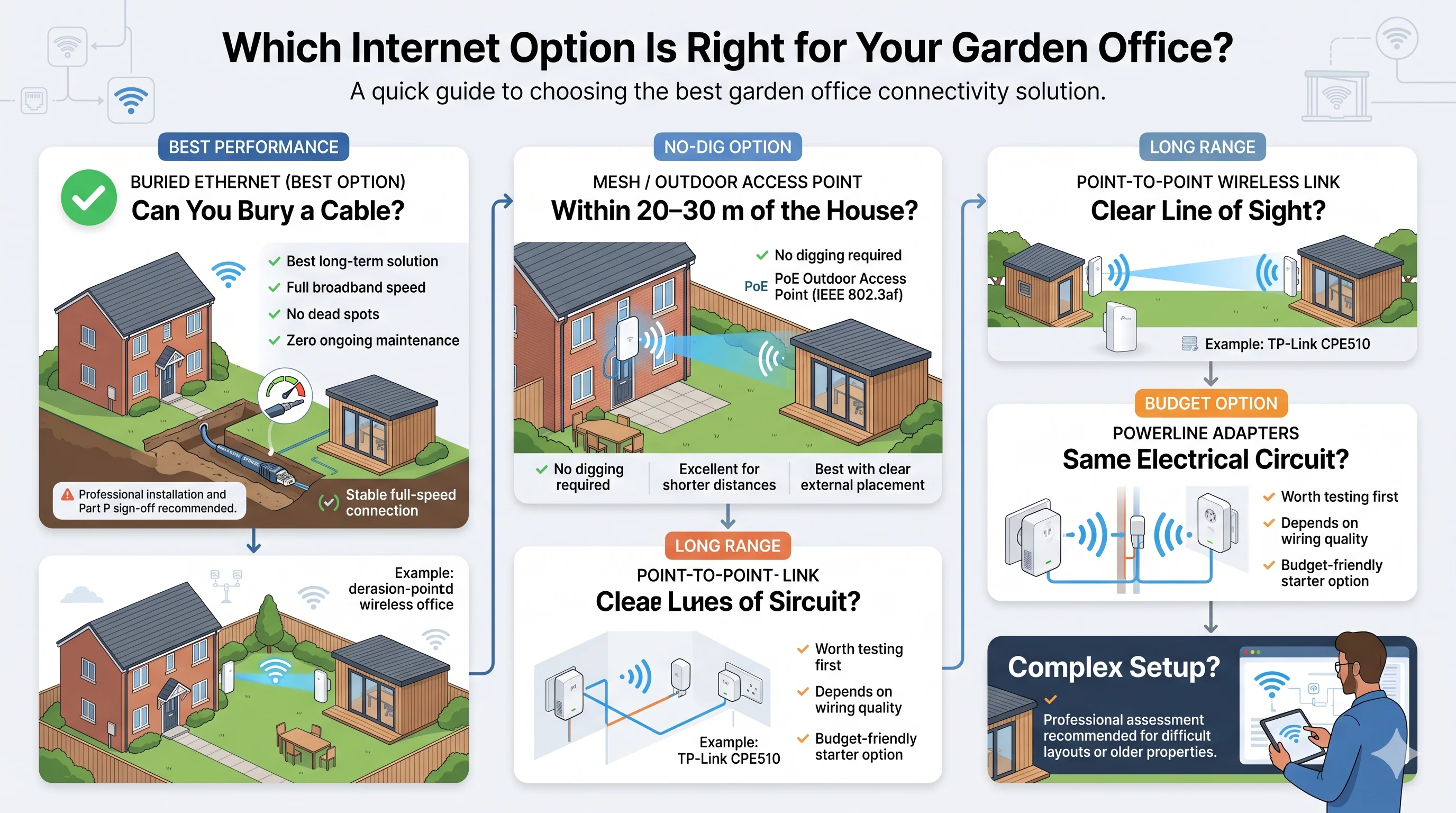
- Can you bury a cable? — Yes: buried armoured ethernet is the best long-term investment regardless of garden size. Full broadband speed, no dead spots, no ongoing management. Have a qualified electrician sign off the work under Part P.
- Within 20–30 m with no thick masonry walls? — Yes: a dedicated mesh node or PoE outdoor access point (IEEE 802.3af) is the best no-dig option. Mount on the exterior wall of the house facing the garden, as high as practical.
- Clear line of sight between house and garden office? — Yes: a point-to-point wireless link (such as the TP-Link CPE510, 300 Mbps) delivers reliable connectivity without digging, even over longer runs.
- Garden office on the same ring main, no separate consumer unit, modern wiring? — Yes: powerline adapters are worth testing with a starter kit before committing further budget.
- None of the above? — Complex situations benefit from a professional assessment. See our coverage area and networking services to discuss your specific setup.
Frequently Asked Questions
Can I use a Wi-Fi extender or repeater instead?
Extenders and repeaters halve available bandwidth at each hop and introduce additional latency into every packet. They are serviceable for light browsing, but they degrade noticeably under video calls and cloud file synchronisation. A mesh node operating in bridged mode — or a dedicated outdoor access point — delivers far more consistent results than any basic Wi-Fi repeater for a garden office.
How deep does ethernet cable need to be buried in a garden?
IET BS 7671 Wiring Regulations require armoured cable (SWA or XLPE-armoured) buried at a minimum of 450–500 mm under a garden. Shallower installations risk the cable being cut by spades or garden forks during planting. Always use armoured cable outdoors, never standard Cat6, and always have a qualified electrician sign off any circuit extension under Part P. If dead zones inside the house are also a concern, our guide on eliminating Wi-Fi dead zones covers the complementary problem.
Will Wi-Fi 6 reach my garden office?
Wi-Fi 6 (802.11ax) improves throughput and handles more simultaneous devices better than Wi-Fi 5. But distance attenuation and obstacle physics are unchanged. A Wi-Fi 6 router will not reach 30 metres through brick walls any better than a Wi-Fi 5 model. The connection method still determines whether you get a reliable signal at the garden office end.
Can I get a separate broadband line installed in the garden office?
Yes — a second broadband connection (FTTP or ADSL) is a legitimate option for a permanent, dedicated workspace. Costs typically run £25–£50 per month. It is overkill for most home garden office setups, but it makes practical sense when the outbuilding functions as an entirely separate business unit with its own needs and budget.
My powerline adapters worked before but have stopped — why?
Replacing consumer units, installing new MCBs, or adding RCDs can electrically isolate circuits that were previously connected on the same ring main. Powerline adapters that paired reliably on original wiring may stop working entirely after an electrical upgrade. An electrician can confirm whether your circuits still share a ring main or have been isolated.
Does Batra.ai install garden office Wi-Fi?
Yes — Batra.ai covers Greater London and the M25 corridor. We design and install buried armoured ethernet runs, outdoor access points, and point-to-point wireless bridges for garden offices and outbuildings of all sizes. Request a free consultation to discuss your specific setup and get a fixed-price quote.
Batra.ai covers Greater London and the M25 corridor. We design and install garden office Wi-Fi solutions using our preferred hardware partner Ubiquiti — buried ethernet, outdoor access points, and point-to-point wireless links — fixed pricing, no ongoing subscription. Request a free consultation →