

A business Wi-Fi site survey is the single most cost-effective step in any wireless deployment, yet most small and mid-sized businesses skip it entirely. According to Ekahau, the industry leader in Wi-Fi planning tools, over 50% of enterprise wireless problems stem from poor access point placement rather than hardware faults. The result is predictable: dead zones in meeting rooms, dropped video calls at peak hours, and IT support tickets that never stop coming.
of unplanned downtime
(EMA Research 2024)
Wi-Fi vs doing it
right the first time
at least one Wi-Fi
dead zone on-site
What Is a Business Wi-Fi Site Survey?
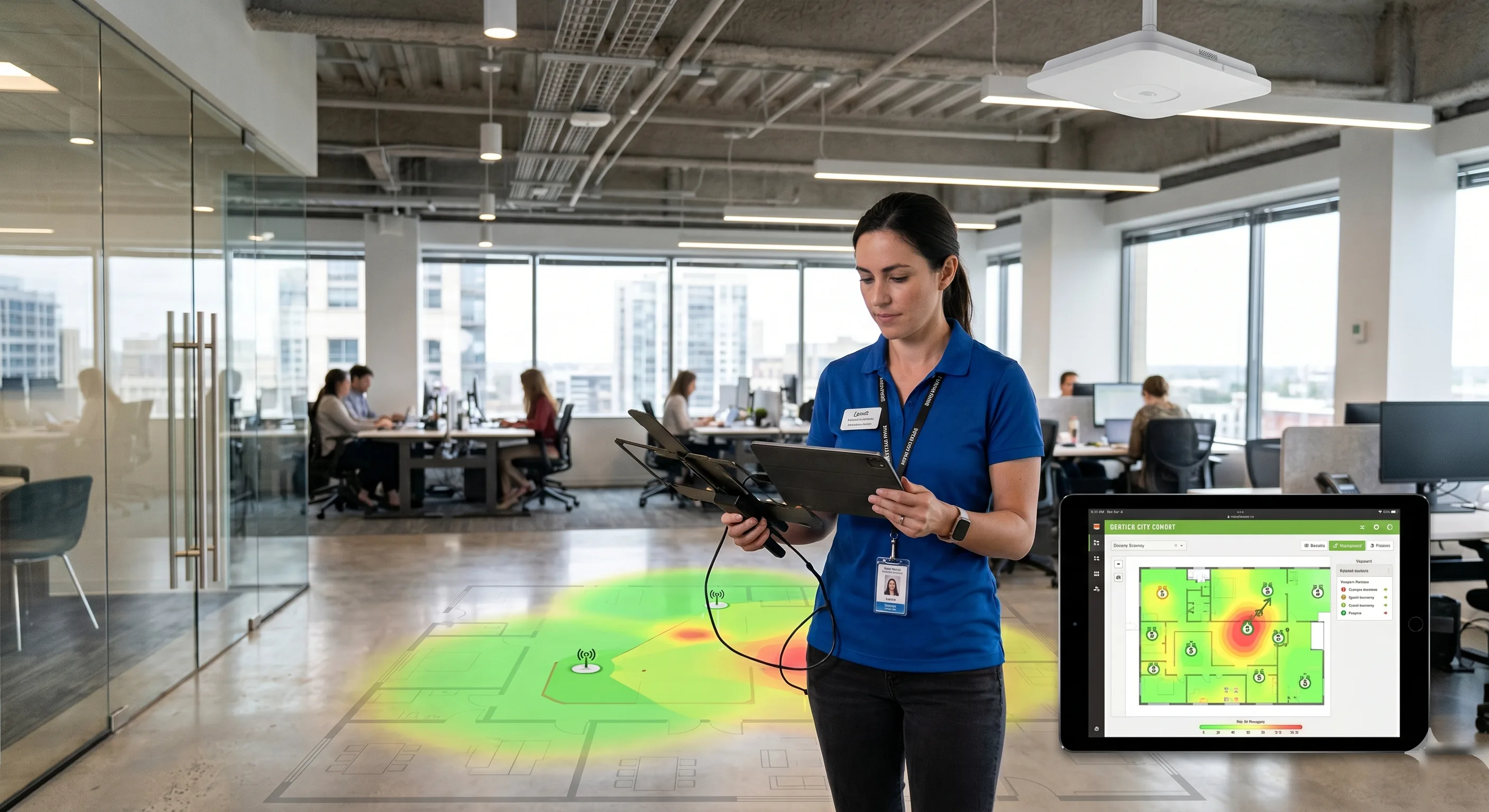
A business Wi-Fi site survey is a structured assessment of your physical premises to determine where access points should be placed, how many you need, and what channel and power settings will deliver reliable coverage. It replaces guesswork with measured data. A qualified installer walks the space with specialist software and hardware, mapping signal propagation, interference sources, and client density patterns before a single cable is pulled or a single AP is mounted.
There are three types of survey, and which one you need depends on whether the network is already installed:
- Predictive survey — uses floor plans and building materials to model coverage before any hardware is installed. Tools like Ekahau AI Pro and Hamina Wireless can simulate signal propagation through walls, glass partitions, and metal structures with high accuracy.
- Active survey — the installer walks the building with a survey device connected to the live network, measuring real throughput, latency, and signal-to-noise ratio (SNR) at every point. This is the gold standard for validating a deployment.
- Passive survey — captures all RF activity in the environment without connecting to any network. Reveals interference from neighbouring Wi-Fi networks, Bluetooth devices, and non-Wi-Fi sources like microwave ovens and wireless CCTV cameras.
Most professional installers combine predictive and active surveys. The predictive model gets the business Wi-Fi design 90% right, and the active walk-through catches the 10% that only shows up in the real world — a metal filing cabinet blocking line-of-sight, a glass partition reflecting signal, or a neighbouring office running 20 APs on the same channel.
What Wi-Fi Heatmaps Actually Reveal
The heatmap is the primary deliverable of any site survey. It is a colour-coded overlay on your floor plan showing where coverage is strong, where it is weak, and where it fails entirely. But a proper survey produces far more than a single signal-strength map. Here is what a professional heatmap report typically includes:
Signal strength (RSSI)
Measured in dBm, this tells you whether devices can hear the access point at a given location. Anything below –70 dBm is unreliable for video conferencing and VoIP. Below –80 dBm, most devices will struggle to maintain a stable connection at all. A business Wi-Fi site survey identifies every location where signal drops below the threshold your applications require.
Signal-to-noise ratio (SNR)
Strong signal means nothing if the noise floor is equally strong. An SNR below 25 dB causes packet retransmissions, which appear to users as slow Wi-Fi even when signal bars look full. Warehouses with motor-driven equipment and offices near lift shafts are common problem areas that only SNR mapping reveals.
Channel overlap and co-channel interference
In dense urban areas, dozens of neighbouring networks may compete for the same channels. A heatmap showing channel utilisation reveals whether your APs need to be on 5 GHz or 6 GHz bands to avoid the congestion that cripples 2.4 GHz in most business districts.
Client density and capacity planning
A single enterprise AP can typically support 30–50 concurrent clients before performance degrades. A site survey maps where staff, customers, and IoT devices cluster during peak hours, so APs can be positioned to distribute load rather than creating bottlenecks. This is critical in hospitality, retail, and open-plan offices where device density is high.

Signal strength (what your phone shows as bars) only measures whether the device can hear the AP. It says nothing about noise, interference, channel congestion, or how many other devices are competing for bandwidth. A site survey measures all four — which is why it catches problems that a quick speed test at reception never will.
The Real Cost of Skipping a Site Survey
The most common reason businesses skip a professional Wi-Fi site survey is cost. A proper survey for a small office of 200–500 m² typically runs $500–$1,500 (£400–£1,200). For larger premises — warehouses, multi-floor offices, hotels — expect $2,000–$5,000 (£1,600–£4,000) depending on complexity. That feels expensive until you compare it to the cost of getting it wrong.
| Expense | Without survey | With survey |
|---|---|---|
| Access points purchased | Often too many or too few — 30% over/under-provisioned | Right-sized to actual coverage needs |
| Cabling runs | $150–$300 (£120–£240) per run to wrong locations | Every cable run lands where data confirms an AP is needed |
| Re-deployment labour | $3,000–$10,000 (£2,400–£8,000) to move APs, re-pull cables, patch drywall | Avoided entirely |
| Support tickets (monthly) | 15–25 Wi-Fi-related tickets per month in a 50-person office | 2–5 tickets after proper deployment |
| Productivity loss | 8–12 minutes per employee per day on connection issues | Negligible |
The maths is straightforward. A 50-person office losing 10 minutes per employee per day to Wi-Fi problems wastes roughly 42 hours of productivity per week. At an average loaded cost of $45 (£36) per hour, that is $1,890 (£1,512) per week — more than the cost of the most comprehensive site survey available. And that is before you count the re-deployment cost when the IT director finally admits the APs need to move.
How Professional Wi-Fi Site Survey Tools Work
The tools used in professional business Wi-Fi site surveys have matured considerably. Here is what the leading platforms offer in 2026:
| Tool | Type | Best for | Approx. cost |
|---|---|---|---|
| Ekahau AI Pro | Predictive + Active + Passive | Enterprise deployments, multi-floor offices, warehouses | $5,995 (£4,796) + $1,995 (£1,596)/yr |
| Hamina Wireless | Predictive (cloud-based) | SMBs, quick predictive designs, remote planning | From $100 (£80)/mo |
| NetSpot | Active + Passive (macOS/Windows) | Small offices, quick validation surveys | Free tier available; Pro from $149 (£119) |
| iBwave | Predictive + Active | Large venues, stadiums, hospitals, multi-building campuses | Enterprise pricing |
| UniFi Design Center | Predictive (browser-based) | DIY planning for UniFi deployments, small–medium offices | Free (UniFi account required) |
Professional installers typically use Ekahau with its Sidekick 2 hardware sensor, which captures a complete RF snapshot as the surveyor walks the building. The software then generates heatmaps, capacity models, and AP placement recommendations automatically. For smaller deployments, cloud-based tools like Hamina allow an installer to draw the floor plan, specify wall materials, and get a predictive design in under an hour.
Common Mistakes a Site Survey Catches
After conducting hundreds of commercial Wi-Fi deployments, certain patterns emerge. These are the mistakes that a professional business Wi-Fi site survey catches before they become expensive problems:
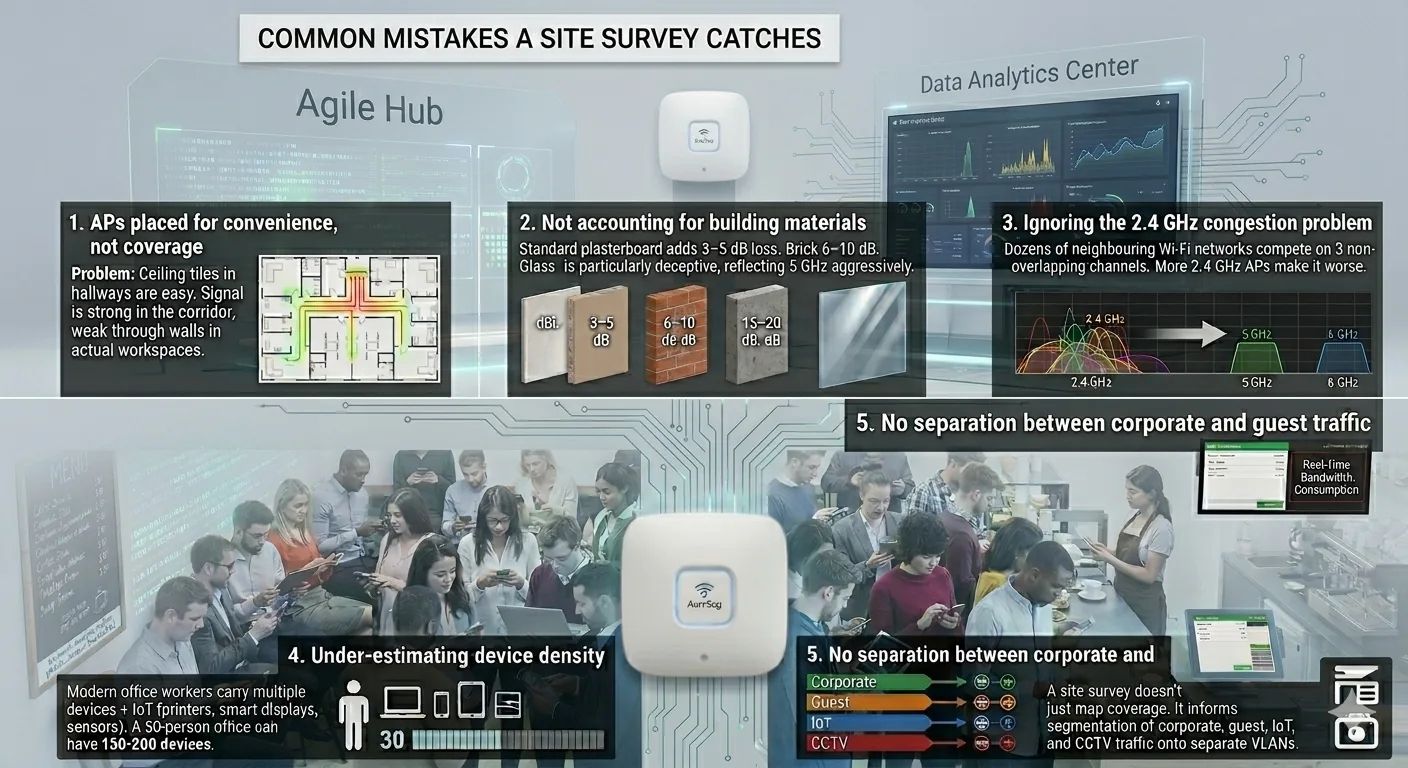
1. APs placed for convenience, not coverage
The most common error. Ceiling tiles above corridors are easy to access, so APs end up in hallways rather than in the rooms where people actually work. The result is strong signal in the corridor and weak signal through the plasterboard walls where it is needed. A predictive survey shows exactly where signal reaches — and where it doesn't.
2. Not accounting for building materials
Standard plasterboard attenuates 5 GHz signal by 3–5 dB. Brick adds 6–10 dB. Reinforced concrete can block 15–20 dB — enough to drop coverage from excellent to non-existent in one wall thickness. Glass partitions, common in modern offices, are particularly deceptive: they look transparent but reflect 5 GHz signal aggressively. A survey tool models these losses accurately.
3. Ignoring the 2.4 GHz congestion problem
In a business park or high street location, dozens of neighbouring Wi-Fi networks are all competing on the three non-overlapping 2.4 GHz channels. Adding more APs on 2.4 GHz makes the problem worse, not better. A passive survey reveals the congestion and guides the design toward 5 GHz and 6 GHz bands where capacity is available.
4. Under-estimating device density
A modern office worker carries a laptop, a phone, and often a tablet. Add IoT devices — printers, smart displays, wireless presenters, environmental sensors — and a 50-person office can easily have 150–200 connected devices. Without capacity planning, APs get overwhelmed at 9:30am when everyone is on Teams calls simultaneously.
5. No separation between corporate and guest traffic
A site survey doesn't just map coverage — it informs the network architecture. Properly segmenting corporate, guest, IoT, and CCTV traffic onto separate VLANs and SSIDs prevents a visitor's device from consuming bandwidth that your point-of-sale system needs. This is a design decision that flows directly from the survey's capacity analysis.
Industries Where Site Surveys Are Non-Negotiable
While every business benefits from a Wi-Fi site survey, certain industries face disproportionately high costs from poor wireless coverage:
- Warehouses and logistics — barcode scanners and handheld terminals must maintain constant connectivity across vast, high-ceiling spaces with metal racking that creates severe multipath interference. A failed scan means a mis-shipped order.
- Hotels and hospitality — guest Wi-Fi expectations are non-negotiable. A single negative review mentioning poor Wi-Fi can cost more in lost bookings than the entire survey and deployment combined.
- Healthcare — wireless medical devices, nurse call systems, and electronic health records depend on seamless roaming. A dead zone in a ward is a clinical risk, not an inconvenience.
- Education — a classroom with 30 students each running a laptop and a phone needs dedicated capacity. The next classroom is the same. Lecture halls need careful antenna placement to cover tiered seating.
- Retail — point-of-sale systems, handheld stock checkers, digital signage, and customer Wi-Fi all compete for airtime. A survey ensures the POS traffic gets priority.
What to Expect from a Professional Site Survey
If you commission a business Wi-Fi site survey, here is what the process looks like from start to finish:
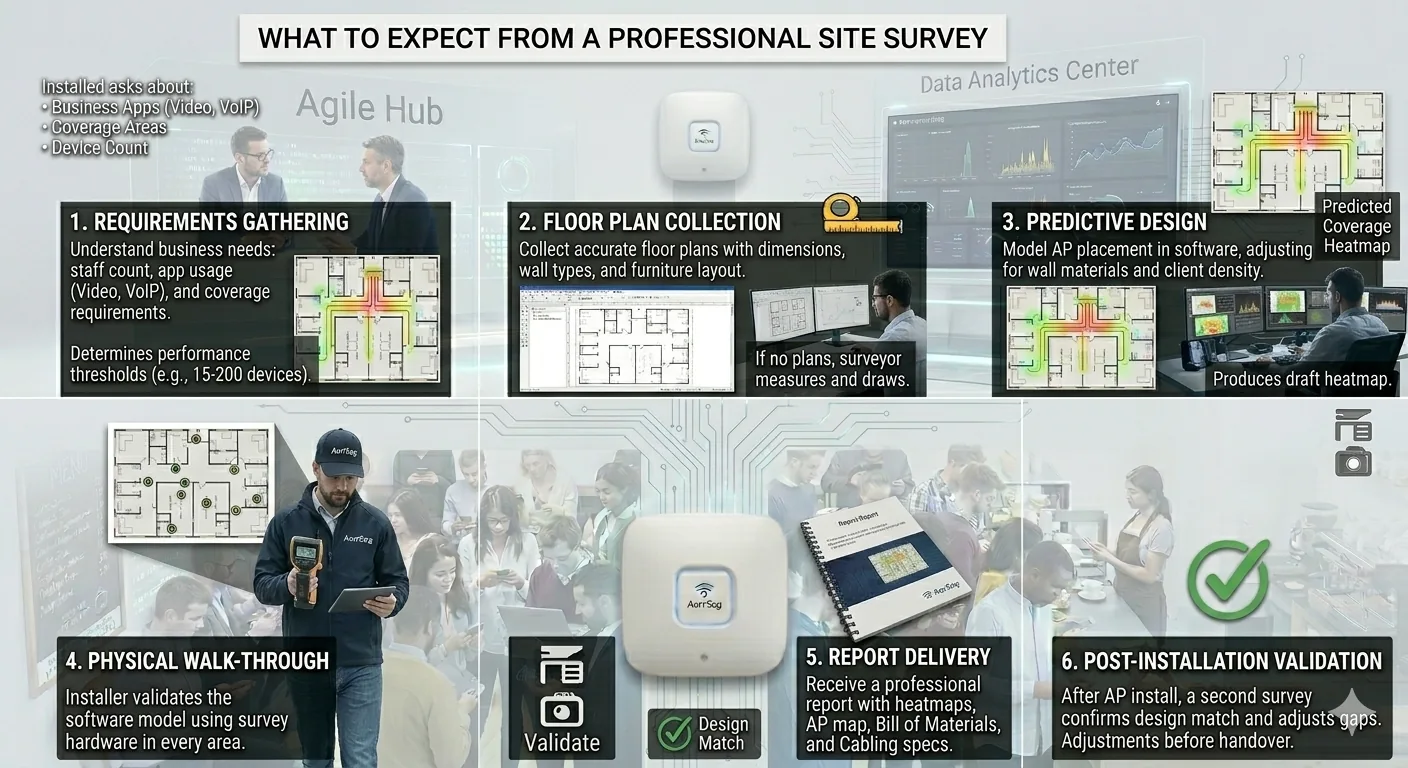
- Requirements gathering — the installer asks about your business: how many staff, what applications they use (video conferencing, VoIP, cloud storage), which areas need coverage, and what devices connect. This determines the performance thresholds the design must meet.
- Floor plan collection — accurate floor plans with wall types, dimensions, and furniture layout. If you don't have plans, the surveyor measures the space and draws them in the survey tool.
- Predictive design — the installer models AP placement in software, adjusting for wall materials, interference, and client density. This produces a draft heatmap showing predicted coverage.
- Physical walk-through — with survey hardware, the installer walks every room, corridor, and outdoor area to validate the model against real-world RF conditions.
- Report delivery — a professional report includes heatmaps (signal, SNR, channel), a recommended AP placement map with mounting heights and angles, a bill of materials, and a cabling specification for each AP location.
- Post-installation validation — after the APs are installed, a second active survey confirms that real-world coverage matches the design. Any gaps are adjusted before handover.
Demand these deliverables: coverage heatmaps at 5 GHz and 6 GHz, SNR heatmaps, channel utilisation maps, a capacity plan per AP, a bill of materials with exact model numbers, mounting locations on the floor plan, and PoE switch requirements. If the report is just a floor plan with circles drawn on it, you haven't had a real survey.
How Much Does a Wi-Fi Site Survey Cost?
Costs vary by premises size, complexity, and the level of detail required. Here is what to expect in 2026:
| Premises size | Survey type | Typical cost |
|---|---|---|
| Small office (up to 200 m²) | Predictive + active validation | $500–$1,000 (£400–£800) |
| Medium office (200–1,000 m²) | Full predictive + active + passive | $1,000–$3,000 (£800–£2,400) |
| Large/multi-floor (1,000–5,000 m²) | Full survey + capacity planning | $3,000–$8,000 (£2,400–£6,400) |
| Warehouse/industrial | Full survey + environmental RF analysis | $2,000–$6,000 (£1,600–£4,800) |
Compare those figures to the cost of a single enterprise-grade access point: a Cisco Meraki MR57 runs $1,500–$2,000 (£1,200–£1,600) per unit. An HPE Aruba AP-635 costs $1,200–$1,800 (£960–£1,440). Even at the value end, a Ubiquiti UniFi U7 Pro is $180–$250 (£144–£200). When a wrong placement decision means buying two extra APs you don't need — or worse, pulling new cables to relocate the ones you already installed — the survey pays for itself before the network is even turned on.
Wi-Fi 7 Makes Site Surveys More Important, Not Less
With Wi-Fi 7 now entering enterprise deployments — the Dell'Oro Group projects over 90% market adoption of Wi-Fi 7 — the case for professional site surveys is stronger than ever. Wi-Fi 7 access points use the 6 GHz band, which has shorter range than 5 GHz and is more aggressively attenuated by walls and obstacles. The higher data rates are only achievable when clients are within the access point's effective range with good SNR.
Multi-Link Operation (MLO), Wi-Fi 7's flagship feature, bonds connections across 2.4, 5, and 6 GHz simultaneously. But MLO only works when a client can reach all three bands from its location. A site survey models this multi-band coverage to ensure MLO-capable devices actually benefit from the technology, rather than falling back to a single band because the 6 GHz signal doesn't reach their desk.
Wi-Fi 7 APs also draw more power — many require PoE++ (802.3bt, up to 60W) rather than the standard PoE+ (802.3at, 30W) that most existing switches provide. A site survey flags this upfront so your structured cabling and switching infrastructure can be specified correctly before installation begins.
DIY Site Surveys: Worth Doing, but Not a Substitute
Free and low-cost tools like NetSpot (free tier for macOS and Windows) and the Wi-Fi analyser apps on Android make it possible to do a basic signal strength check yourself. These are genuinely useful for:
- Identifying obvious dead zones in your current setup
- Checking whether a new AP has improved coverage in a specific area
- Spotting channel congestion from neighbouring networks
- Building a case internally for investing in a professional survey
UniFi Design Center: free predictive planning
If you are using or considering Ubiquiti UniFi hardware, the UniFi Design Center is a genuinely useful free tool for DIY predictive site surveys. It runs entirely in your browser — no software to install, no licence fees — and lets you upload a floor plan, draw walls with specific materials (brick, wood, concrete, glass), and virtually place UniFi access points to visualise estimated 2.4 GHz and 5 GHz coverage.
Key features that make it worth using:
- Predictive heatmaps — visualise signal strength and potential dead zones based on wall materials and AP placement, before buying or mounting anything
- Client experience simulation — test expected signal strength and speeds by virtually moving a client device around your floor plan to optimise roaming and performance
- 3D visualisation — plan your network in 2D or 3D views to better understand spatial coverage across multi-level spaces
- Outdoor mapping — use integrated site maps to visualise outdoor coverage for external APs without needing manual screenshots
The Design Center is a simulation tool, not a live measurement tool. It uses algorithms that may not perfectly account for complex RF interference, furniture, or exact antenna radiation patterns. For the best results, you need to accurately scale your floor plan and specify wall materials correctly — "plasterboard" and "reinforced concrete" produce very different coverage predictions.
1. Plan — use the UniFi Design Center to create your initial layout and estimate the number of APs needed.
2. Verify — once hardware is installed, use the free WiFiman mobile app to perform a live walk-through survey. Walk the space to measure actual signal strength, throughput, and roaming behaviour between APs.
3. Adjust — compare the WiFiman results with your Design Center predictions to fine-tune AP placement, channel assignment, or transmit power levels.
This plan–verify–adjust workflow is a solid approach for small offices, garden offices, and single-floor retail spaces. But DIY tools have real limitations — they measure from one device's perspective, they can't model capacity under load, and they won't catch interference from non-Wi-Fi sources like Bluetooth devices or microwave ovens. For anything with more than 20 connected devices, multiple floors, or mission-critical applications like VoIP and video conferencing, invest in a professional survey.
Choosing an Installer Who Surveys Before Quoting
The fastest way to tell whether a business Wi-Fi installer knows what they are doing is to ask whether they include a site survey before quoting. If the answer is "we'll put three APs in the ceiling and see how it goes," you are about to pay for a deployment that will need to be redone within six months.
A professional installer will:
- Ask for floor plans or arrange a site visit before quoting
- Specify the survey tool they use (Ekahau, Hamina, iBwave)
- Deliver a written report with heatmaps, not just a verbal "it'll be fine"
- Include a post-installation validation survey in the project scope
- Recommend network monitoring after deployment to catch problems early
The cost of a Wi-Fi site survey is typically 5–10% of the total deployment budget. For that investment, you get a deployment that works the first time, a network that scales when you add staff or devices, and an IT team that isn't spending half its week resetting access points and fielding complaints.
Every Batra.ai business Wi-Fi installation includes a professional site survey as standard — no guesswork, no extra charge. We cover Greater London and the M25 corridor. Request a consultation →