

Nearly a quarter of small businesses — 23% — have no backup in place when their internet connection fails, and that figure climbs to 38% among businesses with fewer than ten staff (Zen, 2024). Network failover isn't a nice-to-have anymore — it's the difference between a five-second blip nobody notices and a full afternoon of lost sales, stalled deliveries, and a phone system that won't ring.
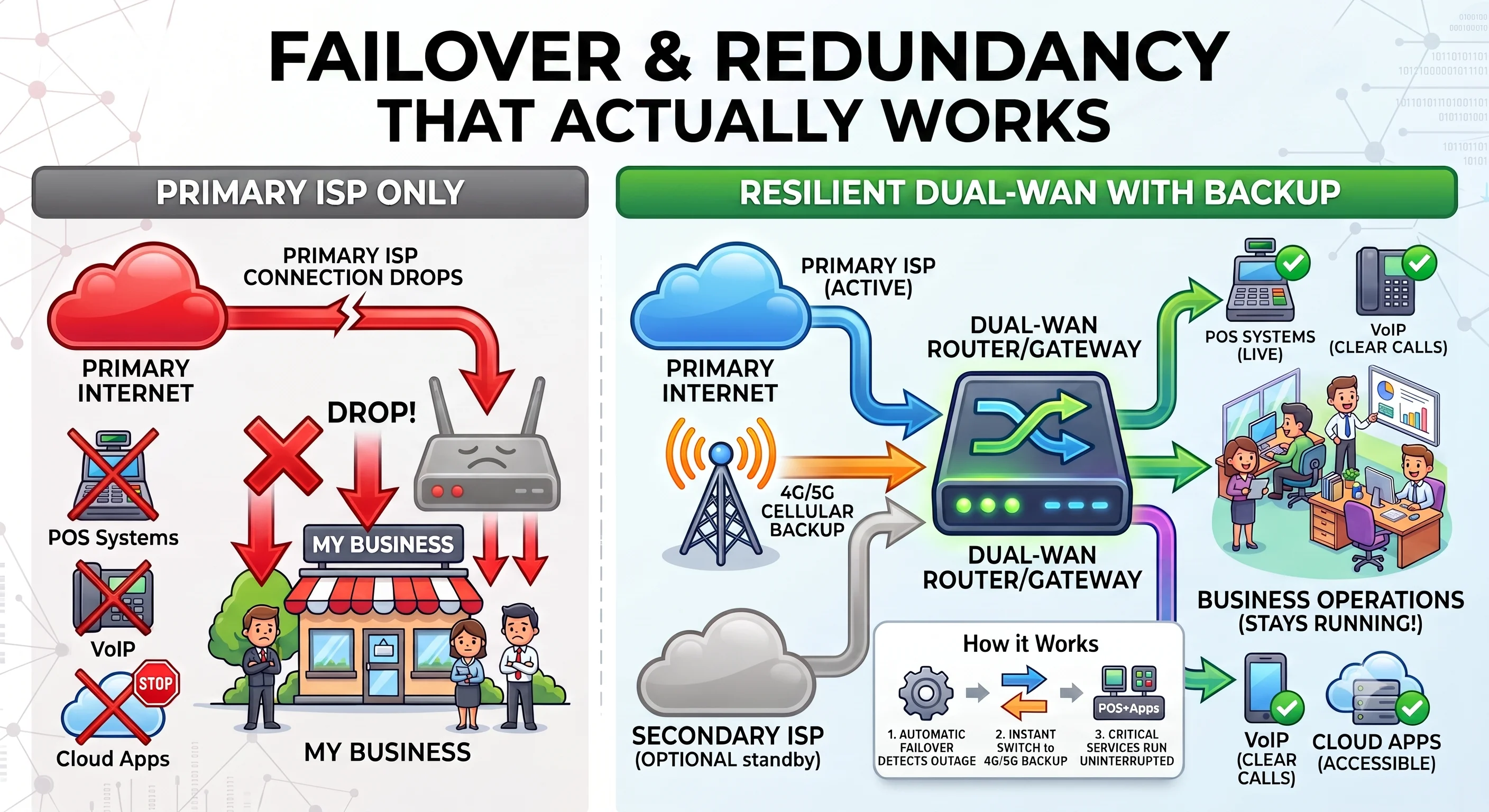
Why One ISP Connection Is a Single Point of Failure
Power failures still cause the most outages — 45% of impactful data centre incidents in 2025 — but network and connectivity failures are the fastest-growing cause, and telecom-related outages rose from 29 recorded incidents in 2020 to 39 in 2025 (Uptime Institute data via Network World, 2026). A single fibre or broadband line, however reliable, is still one dug-up cable or one exchange fault away from taking your whole business offline.
Global network outages aren't rare, either. Cisco's ThousandEyes tracked 514 separate outage events across ISPs, cloud providers, and collaboration platforms worldwide in a single week at the end of July 2026 — and a different week that June saw a 69% jump in outages versus the week before (Network World, 2026). Outage volume isn't just high — it's volatile, which makes "it probably won't happen to us" a bad bet for business continuity networking.
A proper professional network setup treats connectivity the same way it treats power: assume the primary will fail, and design around it. That starts with structured, well-documented cabling — see our guide to structured cabling — so a failover path can be added without ripping out walls later.
Even offices with a "backup" 4G dongle often plug it into the same router, the same power circuit, and the same building as the primary line. True redundancy needs a genuinely separate path — a second ISP, a cellular connection on its own power, or both — not just a spare cable in a drawer.
How Automatic Network Failover Actually Works
Automatic failover means a router or SD-WAN appliance detects when the primary connection drops and reroutes traffic to a backup line without anyone touching a cable. How fast that happens depends entirely on which failover method the hardware uses (Robustel, 2026).
- Cold standby — the backup connection only powers up after the primary fails. Dialling up and registering with the cellular network can take several seconds, which is too slow for VoIP calls or card payments mid-transaction.
- Hot standby — the backup link stays live in the background at all times, so when the primary drops, switchover is sub-second and effectively invisible to users.
- Load balancing / SD-WAN — both connections carry traffic simultaneously, so there's no "switch" moment at all; the surviving link simply absorbs everything.

For most small offices, hot standby is the sweet spot: it's affordable, doesn't need a second full-bandwidth line, and keeps business Wi-Fi and VoIP running through a primary outage without a noticeable gap.
4G or 5G — Which Should Back Up Your Primary Connection?
5G failover connections can exceed 400 Mbps, fast enough to carry VoIP, card payments, and cloud file sync without anyone noticing a fallback happened; 4G remains the safer universal choice in areas with patchy 5G coverage (Robustel, 2026). Coverage, not headline speed, is usually what decides the answer for a specific site.

Most modern dual-WAN routers accept either a 4G or 5G SIM, and several support dual-SIM setups spanning two different mobile networks — useful if one carrier has weak coverage at your site. Data caps matter too: a failover SIM that's designed to carry a full day of traffic needs a much larger allowance than one meant to bridge a 20-minute outage.
Native Wired Dual-WAN on UniFi Gateways
Before adding cellular backup, it's worth knowing that most current Ubiquiti UniFi gateways — our preferred hardware platform for business installs — already support wired dual-WAN failover natively, no extra module required. The UniFi Cloud Gateway Ultra (UCG-Ultra) is $129 (£103) and remaps LAN Port 4 to a secondary WAN, so a second fixed ISP line plugs straight in. The UniFi Network app (Settings → Internet → Multi-WAN) then handles automatic failover-only switching between the two. The higher-tier Dream Machine SE (UDM-SE), around $500+ (£400+), offers the same multi-WAN failover with more throughput and a built-in NVR for CCTV.
That native failover covers two wired connections — a second fibre or broadband line. It doesn't give you a cellular path, which is where a dedicated 4G/5G add-on comes in.
UniFi 5G Backup — plug-in cellular failover for UniFi networks
For the cellular leg specifically, the simplest path on a UniFi network is Ubiquiti's own UniFi 5G Backup. Launched in May 2026, it's a $99 (£79) PoE-powered module that plugs into any UniFi gateway — including the UCG-Ultra and UDM-SE above — and adds automatic 5G RedCap cellular failover on top of (or instead of) a second wired line, with no separate router and no third-party integration to maintain (Ubiquiti, 2026).
[UNIQUE INSIGHT] Real-world speeds land around 30–85 Mbps on 5G RedCap — deliberately modest, because the module is built for reliable failover rather than maximum throughput. In practice that's still enough for VoIP, cloud POS, and file sync to keep working uninterrupted while the primary line is down.
On a recent install for a small logistics office, we found their "backup" 4G router was plugged into the same extension lead as the primary fibre modem — when the power tripped, both went down together. Redundancy has to cover the power path as well as the connection itself, which is one reason we like PoE-powered modules like UniFi 5G Backup: one less separate power brick to fail.
Dual-WAN Routers vs SD-WAN: What's Right for Your Business?
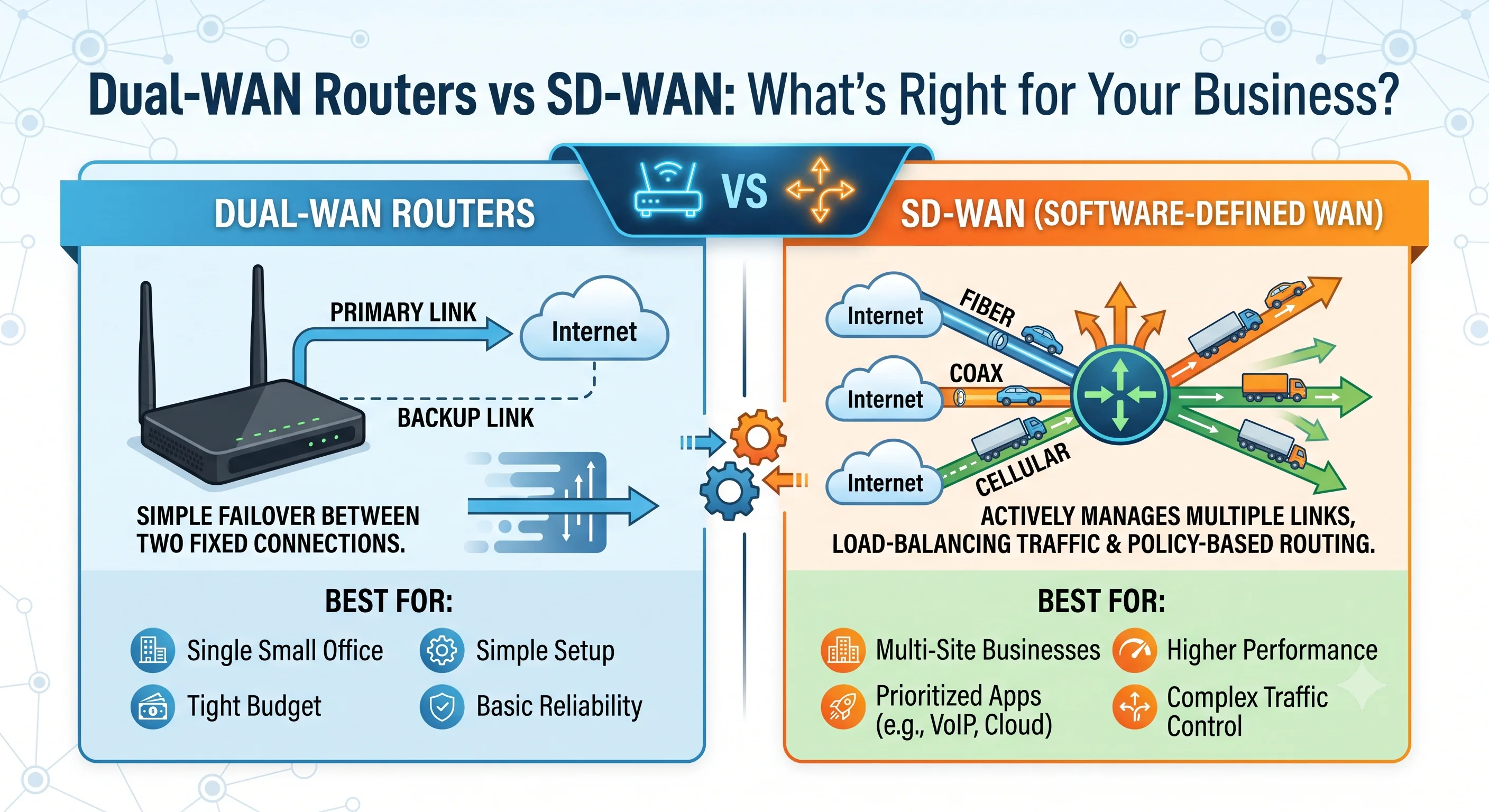
A dual-WAN router simply fails over between two fixed connections. SD-WAN actively manages multiple links at once, load-balancing traffic and applying policy-based routing — useful for multi-site businesses, but overkill for a single small office. The table below compares the main options by budget and use case.
| Vendor / Product | Best For | Failover Type | Approx. Price |
|---|---|---|---|
| Ubiquiti UCG-Ultra / UDM-SE | Businesses wanting a full gateway with native wired dual-WAN | Hot backup via UniFi Network (wired only) | $129–500+ (£103–400+) |
| Ubiquiti UniFi 5G Backup | Add-on for any existing UniFi gateway — cellular failover | Hot standby via UniFi Network | $99 (£79) |
| TP-Link Omada | Small business, budget-friendly integrated 4G | Hot backup + load balancing | $150–400 (£120–320) |
| NETGEAR | SMB, simple plug-and-play setup | Hot backup | $200–500 (£160–400) |
| Peplink | Multi-site SMB, cellular-first design | Hot backup + SD-WAN | $800–1,200 (£640–960) |
| Cradlepoint | Enterprise, managed fleets across sites | SD-WAN + cellular failover | $1,200+ (£960+) |
| Cisco Meraki | Enterprise, centrally managed multi-site | SD-WAN | $1,500+ (£1,200+) |
What Failover Actually Costs — And What Downtime Costs Without It
A dual-WAN or cellular-backup setup costs $99–1,200 (£79–960) as a one-off hardware purchase, plus a data SIM. Compare that to the alternative: small and mid-size businesses report average downtime costs of $8,000–25,000 (£6,400–20,000) per hour, and 78% say a single hour of downtime costs them more than $10,000 (thenetworkinstallers, 2026, citing ITIC and Datto research).
[ORIGINAL DATA] Even at the low end of that range, a $99–400 (£79–320) failover module pays for itself the first time it prevents a single hour of lost trading — and most businesses will hit at least one qualifying outage a year given how volatile global network outage volume has become.

Designing a Redundant Network: A Practical Checklist
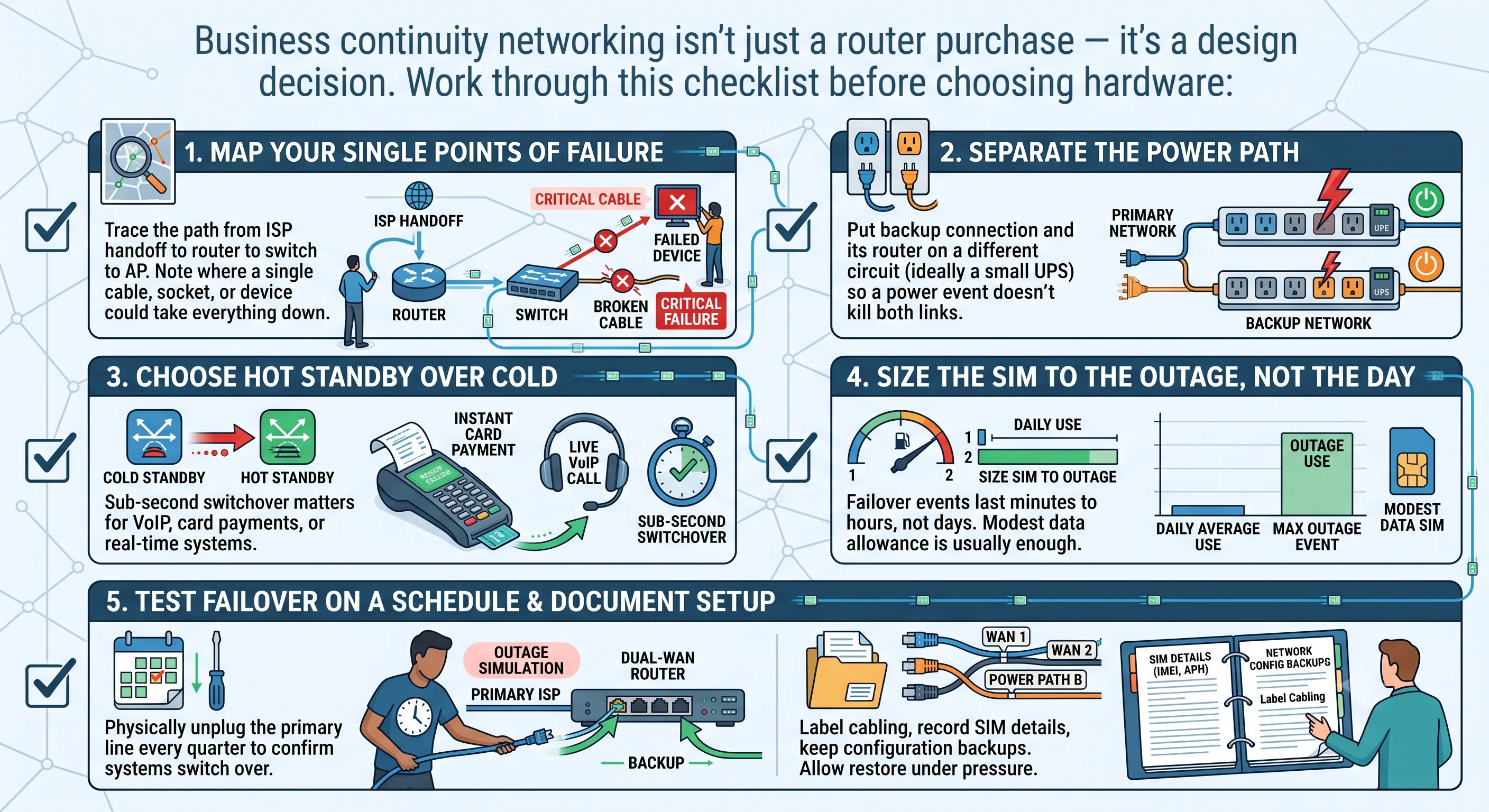
Business continuity networking isn't just a router purchase — it's a design decision that touches cabling, power, and monitoring. Work through this checklist before choosing hardware:
- Map your single points of failure — trace the path from ISP handoff to router to switch to access point, and note anywhere a single cable, socket, or device could take everything down.
- Separate the power path — put the backup connection and its router on a different circuit (ideally a small UPS) so a power event doesn't kill both links at once.
- Choose hot standby over cold where VoIP, card payments, or real-time systems are involved — the sub-second switchover matters more than saving a few pounds a month on SIM data.
- Size the data SIM to the outage, not the day — most failover events last minutes to hours, not a full working day, so a modest data allowance is usually enough.
- Test failover on a schedule — physically unplug the primary line every quarter and confirm systems actually switch over; a failover setup nobody has tested is a guess, not a plan.
- Document the setup — label cabling, record SIM details and APNs, and keep configuration backups so anyone can restore service under pressure, not just the person who installed it.
A properly designed setup draws on the same fundamentals as a good Wi-Fi site survey — understand the environment before you buy hardware. It's also worth revisiting your wider wireless design at the same time; our comparisons of Wi-Fi 6 vs Wi-Fi 6E vs Wi-Fi 7 and common Wi-Fi dead zones both cover issues that compound a connectivity outage if left unaddressed. For the full picture of what we install, see our networking services overview.
Frequently Asked Questions
What is network failover?
Network failover is the automatic switch from a primary internet connection to a backup — usually a second ISP line or a 4G/5G cellular connection — when the primary drops. A dual-WAN router or SD-WAN appliance detects the outage and reroutes traffic, often in under a second with a hot-standby setup.
How fast does automatic failover switch over?
It depends on the method. Cold standby connections need several seconds to register with the backup network before traffic flows again. Hot standby keeps the backup connection live in the background, so switchover happens in under a second (Robustel, 2026).
Should I use 4G or 5G for backup connectivity?
5G failover connections can exceed 400 Mbps, fast enough for VoIP, card payments, and cloud file sync without a noticeable dip (Robustel, 2026). 4G remains the safer default outside strong 5G coverage areas, and many dual-WAN routers support both via a swappable SIM.
What's the difference between a dual-WAN router and SD-WAN?
A dual-WAN router simply fails over between two fixed connections. SD-WAN actively manages multiple links at once, load-balancing traffic and applying policy-based routing — useful for multi-site businesses, but overkill for a single small office.
How much does business network failover cost?
Dual-WAN routers with 4G/5G failover start around $99–400 (£79–320) for small offices, rising to $800–1,200+ (£640–960+) for cellular-first models, plus a data SIM. Compare that to $8,000–25,000 (£6,400–20,000) an hour in typical SMB downtime costs (thenetworkinstallers, 2026).
Can failover replace a second fibre line entirely?
For most small businesses, no — a 4G/5G backup is a stopgap that keeps core systems like POS, VoIP, and cloud apps running, not a full-bandwidth replacement. Businesses with heavy bandwidth needs should pair failover with a genuine second fixed line.
Batra.ai covers Greater London and the M25 corridor. Request a consultation →